
As organizations continue investing in data analytics, cloud intelligence, and AI-driven decision-making, businesses are increasingly evaluating the differences between Microsoft Fabric and Microsoft Power BI.
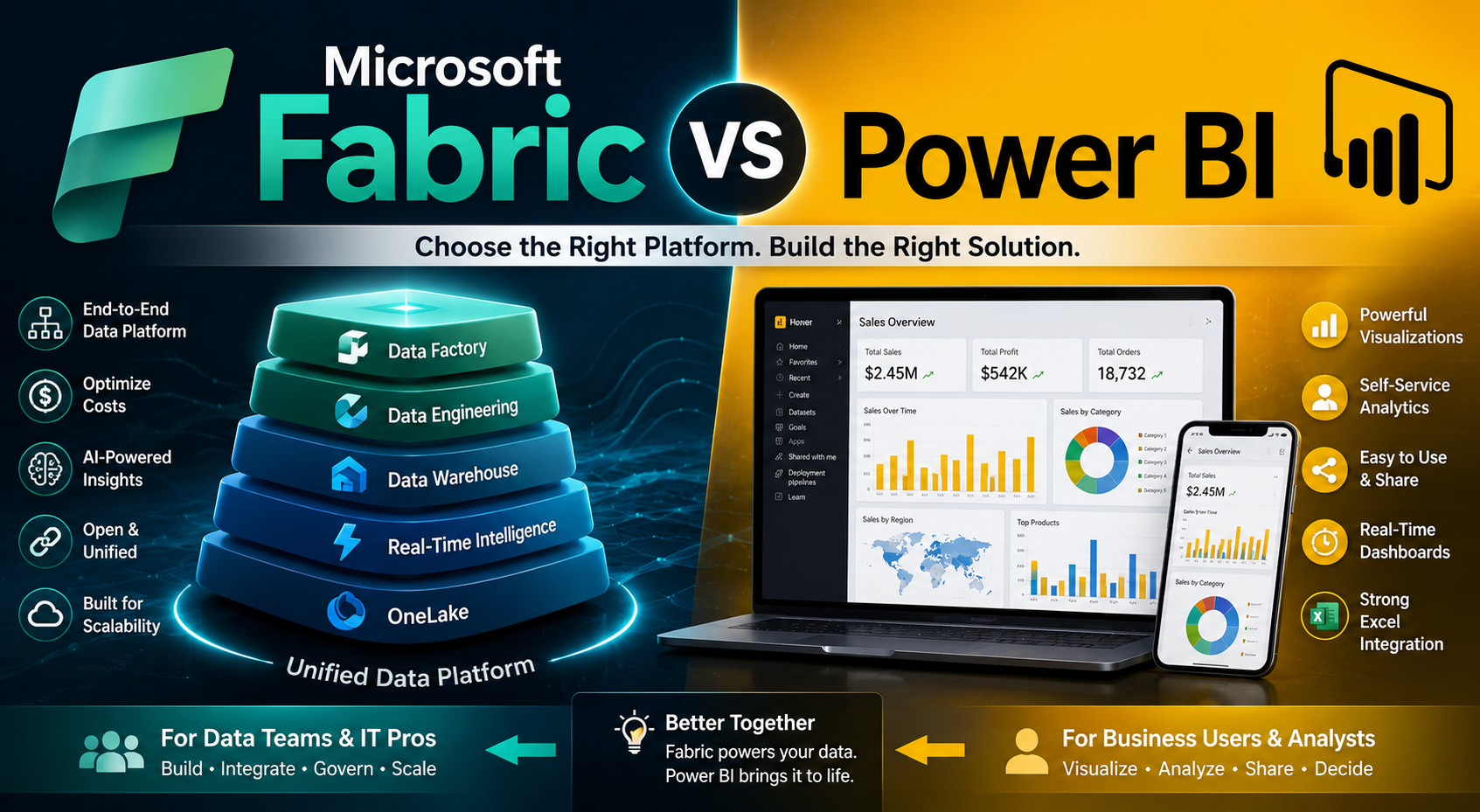
While both platforms belong to Microsoft’s modern analytics ecosystem, they are designed for different purposes and organizational needs. Many businesses mistakenly assume that Microsoft Fabric is simply an upgraded version of Power BI. In reality, Microsoft Fabric is a much broader unified analytics platform that includes Power BI as one of its core components.
Understanding the distinction between Microsoft Fabric and Power BI is essential for organizations planning scalable data architectures, enterprise analytics systems, and AI-powered reporting environments in 2026 and beyond.
At KnexBI, businesses increasingly explore Microsoft Fabric and Power BI to modernize reporting infrastructures, unify enterprise data, and enable real-time analytics at scale.
In this guide, we’ll explore:
- What Microsoft Fabric is
- What Power BI is
- Key differences between the two
- Use cases
- Architecture comparisons
- Pricing considerations
- Performance capabilities
- Enterprise analytics strategies
This comprehensive comparison will help businesses determine which platform best aligns with their reporting and analytics goals.
What is Power BI?
Power BI is Microsoft’s business intelligence and data visualization platform designed to help organizations create:
- Interactive dashboards
- Reports
- Data visualizations
- KPI tracking systems
- Business analytics environments
Power BI allows users to connect multiple data sources, transform datasets, and generate real-time insights through visually rich dashboards.
Businesses commonly use Power BI for:
- Executive reporting
- Sales analytics
- Financial dashboards
- Marketing reporting
- Operational intelligence
- KPI monitoring
Power BI has become one of the most widely adopted business intelligence platforms because of:
- User-friendly interface
- Strong visualization capabilities
- Microsoft ecosystem integration
- Scalable cloud reporting
However, Power BI primarily focuses on the reporting and visualization layer of analytics.
What is Microsoft Fabric?
Microsoft Fabric is a unified end-to-end analytics platform that combines:
- Data engineering
- Data integration
- Data warehousing
- Real-time analytics
- Data science
- AI capabilities
- Business intelligence
Unlike Power BI, Microsoft Fabric is not limited to visualization or reporting. Instead, it provides a centralized cloud-based analytics ecosystem where organizations can manage the complete data lifecycle.
Microsoft Fabric integrates multiple Microsoft analytics services into one unified platform.
Its architecture includes:
- Power BI
- Data Factory
- Synapse Analytics
- Real-Time Analytics
- Data Engineering
- Data Science environments
The goal of Microsoft Fabric is to eliminate fragmented analytics systems and create a unified modern data platform.
Core Difference Between Microsoft Fabric and Power BI
The simplest way to understand the difference is this:
Power BI = Business Intelligence Tool
Power BI focuses mainly on:
- Dashboards
- Reports
- Visual analytics
- Business intelligence
Microsoft Fabric = Complete Analytics Ecosystem
Microsoft Fabric includes:
- Data ingestion
- Data engineering
- Data warehousing
- AI
- Data science
- Governance
- Reporting
- Real-time analytics
Power BI is actually a component inside Microsoft Fabric. This is one of the most important distinctions businesses need to understand.
Architecture Comparison
Power BI Architecture
Power BI mainly operates around:
- Data connections
- Data transformation
- Semantic models
- Visualization layers
- Cloud reporting
Its workflow generally looks like:
Data Source → Power Query → Data Model → Dashboard → Reports
Power BI is excellent for business intelligence but depends heavily on external systems for large-scale enterprise data management.
Microsoft Fabric Architecture
Microsoft Fabric provides a complete cloud analytics infrastructure. Its workflow may include:
Data Ingestion → Lakehouse → Data Engineering → Data Warehouse → AI/ML → Power BI Reporting
Fabric centralizes the entire analytics pipeline into a single environment. This reduces dependency on multiple disconnected tools.
Power BI Strengths
Power BI remains one of the strongest business intelligence platforms in the market.
1. Advanced Data Visualization
Power BI provides:
- Interactive dashboards
- Rich chart libraries
- KPI scorecards
- Drill-down analytics
- Dynamic filtering
Its visualization capabilities are highly mature and enterprise-ready.
2. User-Friendly Interface
Business users can create reports without deep technical expertise. This accessibility helps analysts, marketing teams, finance departments, and executives adopt business intelligence faster.
3. Strong Microsoft Integration
Power BI integrates seamlessly with Microsoft Excel, Azure, SQL Server, Dynamics 365, and SharePoint. This makes it highly valuable for Microsoft-based organizations.
4. Cost-Effective Reporting Solution
Compared to many enterprise BI tools, Power BI offers strong functionality at lower costs. This makes it attractive for small businesses, mid-sized companies, agencies, and enterprises.
Microsoft Fabric Strengths
Microsoft Fabric introduces capabilities that go far beyond traditional BI.
1. Unified Analytics Platform
Fabric centralizes multiple analytics services into one ecosystem. Businesses no longer need separate platforms for ETL, warehousing, data science, real-time analytics, and reporting. This simplifies architecture considerably.
2. OneLake Architecture
OneLake is Fabric’s centralized data lake. It acts as a single unified storage layer for enterprise analytics. Benefits include reduced data duplication, better governance, easier collaboration, and centralized data access. OneLake is one of Fabric’s most transformative innovations.
3. Built-In Data Engineering
Fabric supports advanced data engineering workflows directly inside the platform. Organizations can build pipelines, transform data, process large datasets, and manage analytics workflows without relying on multiple disconnected services.
4. AI and Machine Learning Integration
Fabric strongly emphasizes AI-powered analytics. Capabilities include machine learning workflows, AI-assisted insights, predictive analytics, and real-time intelligence. This makes Fabric highly future-focused.
5. Enterprise Scalability
Fabric is designed for large-scale enterprise analytics environments. It handles massive datasets, cloud-scale processing, real-time analytics, and enterprise governance more efficiently than standalone Power BI implementations.
Microsoft Fabric vs Power BI: Feature Comparison
| Feature | Power BI | Microsoft Fabric |
|---|---|---|
| Business Intelligence | Yes | Yes |
| Data Visualization | Excellent | Excellent |
| Data Warehousing | Limited | Advanced |
| Data Engineering | No | Yes |
| AI & Machine Learning | Limited | Extensive |
| Real-Time Analytics | Partial | Advanced |
| Unified Analytics Platform | No | Yes |
| OneLake Integration | No | Yes |
| Enterprise Data Management | Moderate | Strong |
| ETL Capabilities | Basic | Advanced |
| Scalability | High | Enterprise-Scale |
| Cloud Analytics | Yes | Yes |
When Should Businesses Use Power BI?
Power BI is ideal when businesses primarily need:
- Dashboard reporting
- KPI visualization
- Executive analytics
- Operational dashboards
- Department-level BI
Organizations with relatively straightforward reporting requirements often succeed with Power BI alone. It is especially useful for small businesses, mid-sized organizations, marketing agencies, and financial reporting teams. Power BI provides powerful reporting without requiring full enterprise data infrastructure.
When Should Businesses Use Microsoft Fabric?
Microsoft Fabric is ideal for organizations requiring:
- Enterprise analytics
- Unified data architecture
- Real-time analytics
- AI-powered workflows
- Large-scale cloud data management
Fabric is particularly valuable for large enterprises, data-driven organizations, complex analytics ecosystems, AI-focused businesses, and organizations managing massive datasets. Fabric becomes more beneficial as data complexity grows.
Microsoft Fabric and Power BI Together
An important point many businesses miss is that Microsoft Fabric and Power BI are not competitors in the traditional sense. Power BI is integrated within Fabric itself.
Many organizations will use:
- Fabric for data infrastructure
- Power BI for visualization and reporting
This combined approach enables centralized data management, advanced analytics, enterprise scalability, and interactive dashboards. Fabric enhances the capabilities surrounding Power BI.
Pricing Considerations
Pricing structures differ significantly between the two platforms.
Power BI Pricing
Power BI generally offers lower entry costs, flexible licensing, and user-based pricing, making it accessible for smaller teams.
Microsoft Fabric Pricing
Fabric pricing depends more heavily on compute capacity, storage usage, and analytics workloads. Fabric is typically more suitable for organizations investing heavily in enterprise analytics transformation.
Performance and Scalability
Power BI performs exceptionally well for departmental reporting, mid-scale analytics, and standard dashboards. However, enterprise-scale environments sometimes require additional infrastructure support.
Microsoft Fabric provides distributed analytics, large-scale processing, centralized architecture, and advanced compute scalability. This enables more efficient handling of enterprise workloads.
AI and the Future of Analytics
AI is rapidly transforming business intelligence. Microsoft Fabric is strongly aligned with AI-assisted analytics, predictive intelligence, automation, and cloud-native analytics.
While Power BI also incorporates AI features, Fabric represents Microsoft’s broader long-term vision for intelligent enterprise analytics ecosystems. Organizations planning future-ready analytics architectures increasingly evaluate Fabric adoption strategies.
Common Misconceptions
- “Microsoft Fabric Replaces Power BI”
This is incorrect. Power BI remains a major component within Fabric.
- “Fabric is Only for Large Enterprises”
While enterprise organizations benefit most, Fabric can also help mid-sized companies modernize analytics infrastructure.
- “Power BI is Outdated”
Power BI remains one of the most powerful BI tools globally and continues evolving alongside Fabric.
How KnexBI Helps Businesses Implement Power BI and Fabric
At KnexBI, businesses implement scalable analytics solutions using:
- Power BI dashboards
- Microsoft Fabric architecture
- Enterprise reporting systems
- Cloud analytics platforms
- Real-time intelligence environments
KnexBI helps organizations design BI strategies, optimize data architectures, improve reporting performance, build scalable cloud analytics systems, and modernize enterprise business intelligence. This enables organizations to maximize the value of modern analytics technologies.
Future of Microsoft Fabric and Power BI
The future of analytics will increasingly revolve around AI-driven reporting, unified data platforms, cloud-native analytics, real-time intelligence, and predictive decision-making. Microsoft Fabric is positioned as Microsoft’s long-term analytics ecosystem, while Power BI remains central to visualization and reporting.
Businesses adopting scalable cloud analytics strategies today will be better prepared for the future of enterprise intelligence.
Purposes of Power BI and Microsoft Fabric
Microsoft Fabric and Power BI serve different but complementary purposes within Microsoft’s analytics ecosystem.
Power BI excels at:
- Dashboard creation
- Business intelligence
- Data visualization
- KPI reporting
Microsoft Fabric expands far beyond BI by providing:
- Unified analytics
- Data engineering
- AI integration
- Enterprise-scale architecture
- Centralized cloud analytics
For many organizations, the best approach is not choosing one over the other, but understanding how they work together.
Conclusion
As businesses continue investing in AI-powered analytics and cloud intelligence in 2026 and beyond, both Power BI and Microsoft Fabric will play critical roles in modern data-driven decision-making.






